# Configuring Document Product Registration Checks

Organizations using both a RIM Vault and a PromoMats Vault can now leverage product and registration hierarchies to ensure a document includes at least one approved Registration for the _Country_ and any other product-related document fields, such as _Product_ or _Product Family_, prior to moving the document to steady state.

If the Registration is withdrawn, Vault can withdraw the document automatically via the _Auto Expire Documents (Withdrawn Registrations)_ job.

This information from RIM helps simplify and automate the process so you know which products have been approved or withdrawn in which market (country) for documents in PromoMats. 


<div class="note-border alert-info">
  <div class="alert alert-info" role="alert">
    <div><i class="far fa-info-circle"></i></div>
    <div class="alert-text">
      <p><strong>Note</strong>: This feature is only available in PromoMats Vaults using the <a href="/en/lr/72309/">RIM to PromoMats Vault Connection</a>, and requires you to activate the <em>Registration</em> Integration. We also highly recommend activating the <em>Product</em> Integration.</p>
    </div>
  </div>
</div>


## Updating a Workflow

As part of the configuration process, you can add the **Product Registration Check Function** to workflows. This application function checks whether any _Approved_ or _Renewed_ Registration, Registered _Brand_, Registered _Packaged Product_, or Registered _Indication_ records exist for that document by matching the _Country_ or _Product_ -related document fields to Registration-related objects including _Brand_, _Product Family_, _Product Form_, _Product Variant_, _Packaging_, and _Indication_. This functionality requires users to populate the _Country CDA_ field on _Country_ records. You can update this field to allow for multiple values to account for Registrations that are for a broader region.

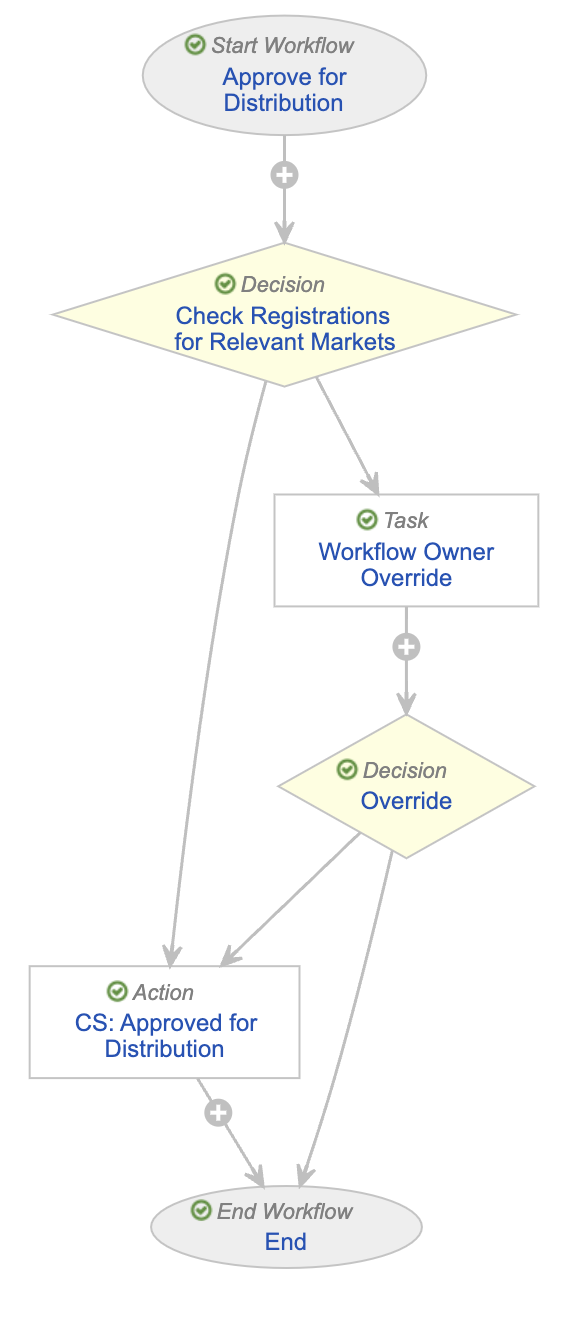
We recommend adding the **Product Registration Check Function** to the _Approved for Distribution_ [workflow](/en/lr/50498/):

  1. Navigate to **Admin > Configuration > Workflows**.
  2. Click the **Approved for Distribution** workflow.
  3. [Add a _Decision_ step](/en/lr/50498/#decision) for the **Product Registration Check Function** and configure it as follows:
     1. Condition Type: **Formula evaluates to TRUE**
     2. Formula: `AppProductRegistrationCheck(Document.global_id__sys, Document.major_version_number__v, Document.minor_version_number__v)`
     3. Then: **CS: Approved for Distribution**
     4. Else then: **Workflow Owner Override**
  4. Click **Save**.

<a href="https://platform.veevavault.help/assets/images/Approved_for_Distribution_Workflow_App_Function_24r34.png" data-lightbox="images" data-title="" data-alt="Approved for Distribution workflow">
  <img class="docimage" src="https://platform.veevavault.help/assets/images/Approved_for_Distribution_Workflow_App_Function_24r34.png" alt="Approved for Distribution workflow" style="max-width: 30%;"  />
</a>

## Configuring Automatically Withdrawn Documents

You must add the **Auto-Withdraw Documents** document type group to any document types considered for withdrawal based on withdrawn Registrations via the RIM to PromoMats Connection.

The _Auto Expire Documents (Withdrawn Registrations)_ job withdraws documents belonging to this document type group when there are only withdrawn Registrations that apply to the document. If at least one approved Registration or Registration-related object applies to the document, Vault does not withdraw the document. Vault sets the relevant documents to the obsolete state defined for the documents' assigned lifecycles. If there is no obsolete state defined on the assigned lifecycle, the job fails and Vault sends the job owner a notification. 

By default, the _Auto Expire Documents (Withdrawn Registrations)_ job is inactive. To activate the job, navigate to **Admin > Operations > Job Definitions > Auto Expire Documents (Withdrawn Registrations)** and set the _Status_ field to **Active**. 

## Related Permissions

You need a _System Admin_ security profile as well as the following permissions to configure document product registration checks:

| Type | Permission Label | Controls |
| -- | -- | -- |
| Security Profile | Admin: Application: Manage Connections | Ability to set up the RIM to PromoMats standard connection |
| Security Profile | Admin: Operations: Jobs: Read, Edit | Ability to view and edit existing job definitions |
| Security Profile | Admin: Configuration: Document Lifecycles: Read, Edit | Ability to view and edit existing document lifecycles |